


Home > Spotify Music Tips > Spotify vs. YouTube Music
Spotify vs. YouTube Music: Which One Should You Choose?

When your phone runs out of storage or your budget rejects another subscription, a crucial question arises: Spotify or YouTube Music?
This isn’t a trivial either-or. It’s a pick between two standout music streaming experiences. Spotify, the leading music platform, dominates with hyper-accurate AI recommendations and a thriving listener community. YouTube Music, meanwhile, taps into the world’s largest audio-visual library to deliver hidden gems: live gigs, viral covers, and exclusive artist content you won’t find elsewhere.
This 2026 Spotify vs. YouTube Music comparison reaks down subscription costs, lossless audio quality, music library size, and exclusive features to help you decide wisely.
💡 You May Like: Spotify vs. Pandora: Which One Will You Go For?
- 1. Spotify vs. YouTube Music: Subscription Pricing
- 2. Spotify vs. YouTube Music : What You Can/ Can't Get on Free Tier
- 3. Spotify vs. YouTube Music : Audio Quality & Streaming Performance
- 4. Spotify vs. YouTube Music: Music Library
- 5. Spotify vs. YouTube Music: Exclusive Features
- 6. Spotify vs. YouTube Music: Discounts Offers
- 7. 🔥 Extra Tips: How to Download Spotify & YouTube Music to MP3?
1. Spotify vs. YouTube Music: Subscription Pricing
Monthly costs are the first hurdle for most streamers. Both Spotify and YouTube Music offer tiered plans, but subtle differences in family sharing, student discounts, and bundle options can tip the scale—especially for long-term users. Below is a head-to-head breakdown of 2026 pricing and key value points.
Ultimately, budget-focused users and Google ecosystem fans will lean toward YouTube Music, while those prioritizing audiobooks or student entertainment bundles will find more value in Spotify.
Note: Spotify’s Hulu + SHOWTIME student bundle requires annual re-verification of student status; failure to do so will auto-upgrade to the standard individual plan. YouTube Music’s family plan requires all members to reside at the same address, with periodic location checks to avoid plan termination.
2. Spotify vs. YouTube Music: What You Can/ Can't Get on Free Tier
If you’re not ready to pay for a premium plan, the free tier is a great way to test the service. But there are clear limits on both platforms—from ad frequency to playback control. Below is a detailed breakdown of what’s available (and what’s not) for free users in 2026.
Spotify Free wins for sound quality and podcast access, while YouTube Music Free offers better playback control. If you hate shuffling and want to pick exact songs, YouTube Music’s free tier is more flexible—even with stricter skip limits. But if you value clearer audio or listen to lots of podcasts, Spotify is better. Neither lets you download music offline, and both have unavoidable ads.
💡 May Need: Keep Spotify downloads when switching to free plan: NoteCable backs up your entire Spotify music library in a few simple clicks! >> Explore
3. Spotify vs. YouTube Music : Audio Quality & Streaming Performance
Audiophiles and casual listeners alike care about sound clarity. In 2026, both platforms offer lossless audio, but compression rates, supported formats, and offline playback quality vary—critical for users with high-end headphones or spotty internet.
We can easily find that Spotify outperforms YouTube Music in audio quality across tiers, especially with lossless options. For offline playback, YouTube Music has no song download limits, while Spotify has device and quantity restrictions.
🟢 Choose Spotify if: you prefer to superior sound quality, especially lossless.
🔴 Pick YouTube Music if: You priotize unlimited offline downloads.
✨ Kind Tips: YouTube Music’s adaptive quality may automatically lower bitrate on cellular data to save your data plan, unless you manually set it to "High" in settings.
💡 Hot Search: How to Download Spotify Lossless Audio on Computer for permenant access? >> Explore
4. Spotify vs. YouTube Music: Music Library
A streaming service is only good if it has the music you want. Spotify and YouTube Music both have millions of tracks, but they excel in different areas. Spotify is better for mainstream and indie music, while YouTube Music uses its parent company’s library to offer unique content like live shows and fan covers. Let's have a close look:
✨ Kind Tips: Spotify’s Discover Weekly updates every Monday and is based on your past 7 days of listening, pausing it for a week will reset its algorithm. YouTube Music’s "Trending" tab is region-specific, so global hits may not appear if you’re in a niche market.
Spotify and YouTube Music’s libraries fit different listening habits. Spotify has over 100 million tracks, with strong curation for mainstream pop, rock, indie, classical, and jazz. Its Discover Weekly, Release Radar, and AI DJ are great for finding new music. YouTube Music has 95 million+ tracks and stands out for unique content: live concerts, fan covers, regional music, and lyric videos. It’s better for hip-hop, EDM, and global music, but lacks Spotify’s podcast integration and indie music focus.
🟢 Choose Spotify if: You listen to mainstream/indie music, rely on personalized recommendations, or enjoy podcasts.
🔴 Pick YouTube Music if: You want live/cover content, global music, or to switch between audio and music videos.
5. Spotify vs. YouTube Music: Exclusive Features
In 2026, numerous streaming services have rolled out unique tools—from AI helpers to social features—to enhance user retention. For instance, Apple Music now offers a science-backed sound therapy audio collection, designed to help listeners focus, relax, and sleep better. Amazon Music has integrated the conversational AI assistant Alexa+, which answers complex music-related questions through natural dialogue. So, what distinctive features have Spotify and YouTube Music introduced to stand out?
✨ Kind Tips: Spotify’s AI DJ is currently only available in English, Spanish, and Portuguese; non-native speakers may experience less accurate recommendations. YouTube Music’s Pixel-exclusive features require a Google Pixel 6 or newer—older Android phones miss out on tools like Live Transcribe for lyrics.
Spotify’s exclusive features focus on community and music discovery, while YouTube Music’s are about interaction and linking with Google services. Spotify’s AI DJ and text-to-playlist tool give targeted music suggestions. Its collaborative playlists and Friend Activity let you share music with others. YouTube Music’s strengths are video-related: AI video editing for social media, artists replying to fans, and tight integration with Google.
🟢 Choose Spotify if: You want to share playlists with friends or use AI to find new music.
🔴 Pick YouTube Music if: You need to edit music videos, use Google devices, or interact with artists directly.
💡 May Need: Want to download Spotify podcasts to mp3 format? Here's a tool that's best for you, whether you're a Spotify user or not. >> Explore
6. Spotify vs. YouTube Music: Discount Offers
Getting the best discount is essential for a premium yet affordable music streaming experience. For 2026, both Spotify and YouTube Music are offering competitive promotions. The comparison below highlights the key discounts and deals to help you make a cost-effective choice.
Note: The above offers may vary by region or country. For more details, please refer to the official website.
🟢 Overall, Spotify offers a wider range of discount options compared to YouTube Music. If discounts are your primary consideration and you want to maximize savings through various promotions, Spotify is undoubtedly the best choice.
🔴 However, if you are already a heavy user of the YouTube ecosystem and plan to use the platform long-term, YouTube Music may be the smarter option. It provides significant direct discounts through annual subscription plans, offering a cost advantage that Spotify does not.
7. 🔥 Extra Tips: How to Download Spotify & YouTube Music to MP3?
🔍 The Tool You Need: Sidify All-In-One Music Converter
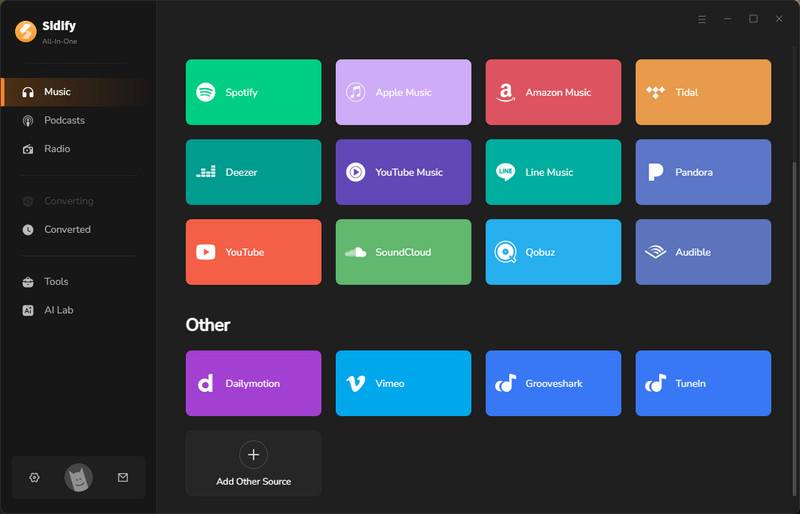
Sidify All-In-One Converter is a reliable, multifunctional streaming downloader designed for users worldwide. It supports nearly all major streaming services, including popular platforms like Spotify, Apple Music, YouTube Music, Amazon Music, Tidal and more. With Sidify, you can effortlessly extract high-quality audio from these services and save it in various formats such as MP3, WAV, AAC, ALAC, AIFF, and FLAC.
No need to switch between multiple streaming apps—Sidify allows you to keep your files in lossless audio quality along with complete ID3 tags. Enjoy your favorite music freely on any device without subscription limitations, all from a single application.
| Compatibility | Pricing | Quality | Tags | |||
|---|---|---|---|---|---|---|
| Windows, Mac | Free Trial | 320kbps, HiFi, Master or Ultra HD | Title, Artist, Album, Artwork, Track number, Year | |||
|
||||||
How to use Sidify All-In-One Music Converter?
Step 1Run Sidify All-In-One on your computer and select Spotify from the list of supported streaming platforms.
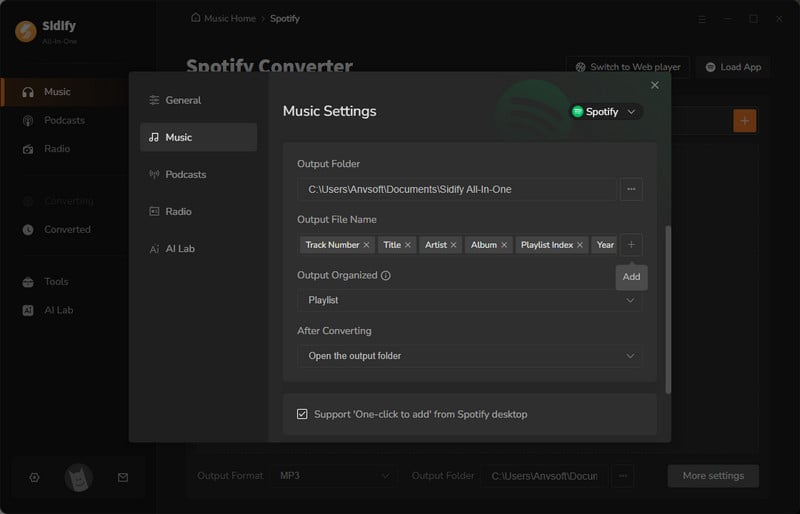
Step 2Once you open the converter interface, you can set the output format and output folder. By clicking "More Settings", you can also change the output file name and the file organization method. Also, you can find the lyrics saving option here.
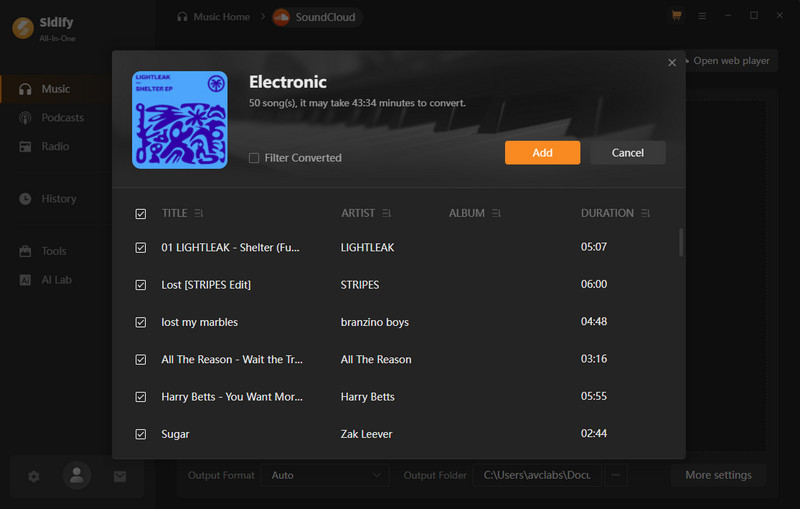
Step 3 From the pop-up window, you ought to log in with your music account to access your Spotify library. Then, access your target playlist and tap the Add button to pick specific songs or the whole playlist to download.
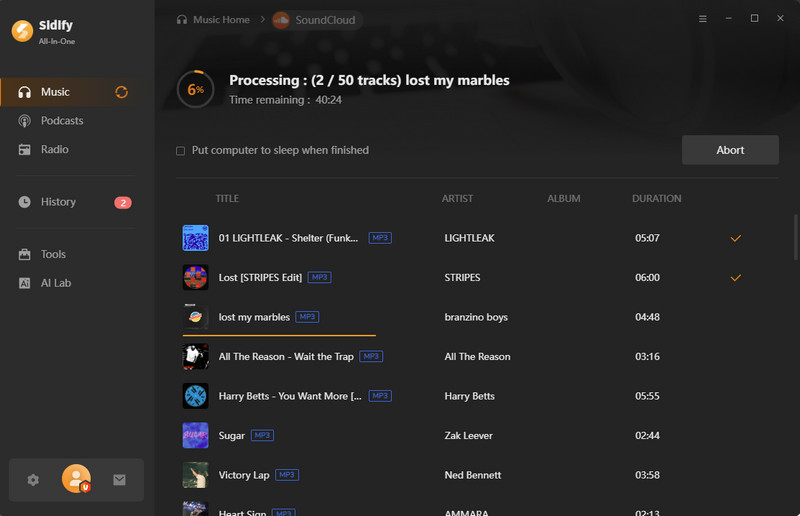
Step 4 Click the Convert button to start the process. Sidify will work at 40x speed to download the selected songs in bulk. In this process, the ads will get removed.
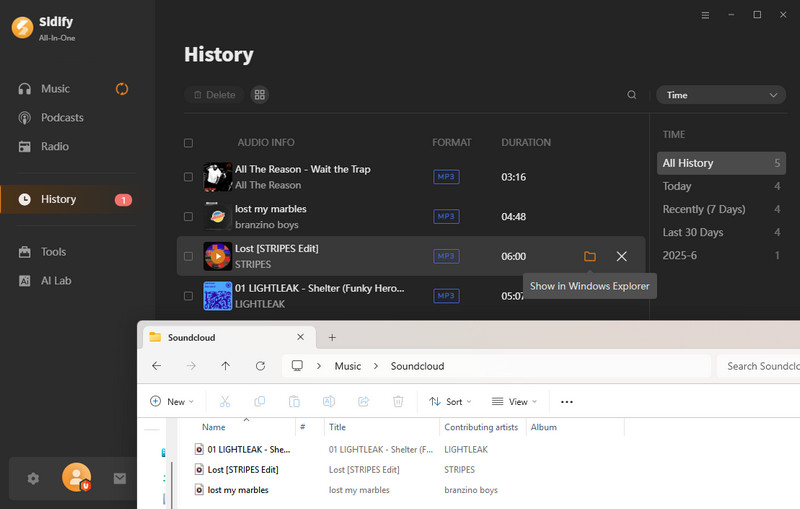
Step 5Once the download is done, open the History section and view all the downloaded songs downloaded tracks without ads.
End Words
In 2026, there’s really no “wrong” choice—only the one that best fits how you listen to music. Both Spotify and YouTube Music offer free trials, so you can decide which one suits your habits before committing.
If you want personalized music recommendations, higher standard audio quality, podcasts, or easy playlist sharing—go with Spotify. If you prefer a seamless switching between music and video, access to live and cover content, or deeper integration with Google devices—choose YouTube Music.
And if you love both, try the Sidify All-In-One Converter: a single tool that lets you enjoy the best of both worlds.

